Three.js water performance on mobile
A calm harbour can slow down a phone before a single wave moves. The canvas has pixels to shade, the mirror can draw the docks again, and each separate post can add another draw call. Change one setting at a time to find out which part is costing you.
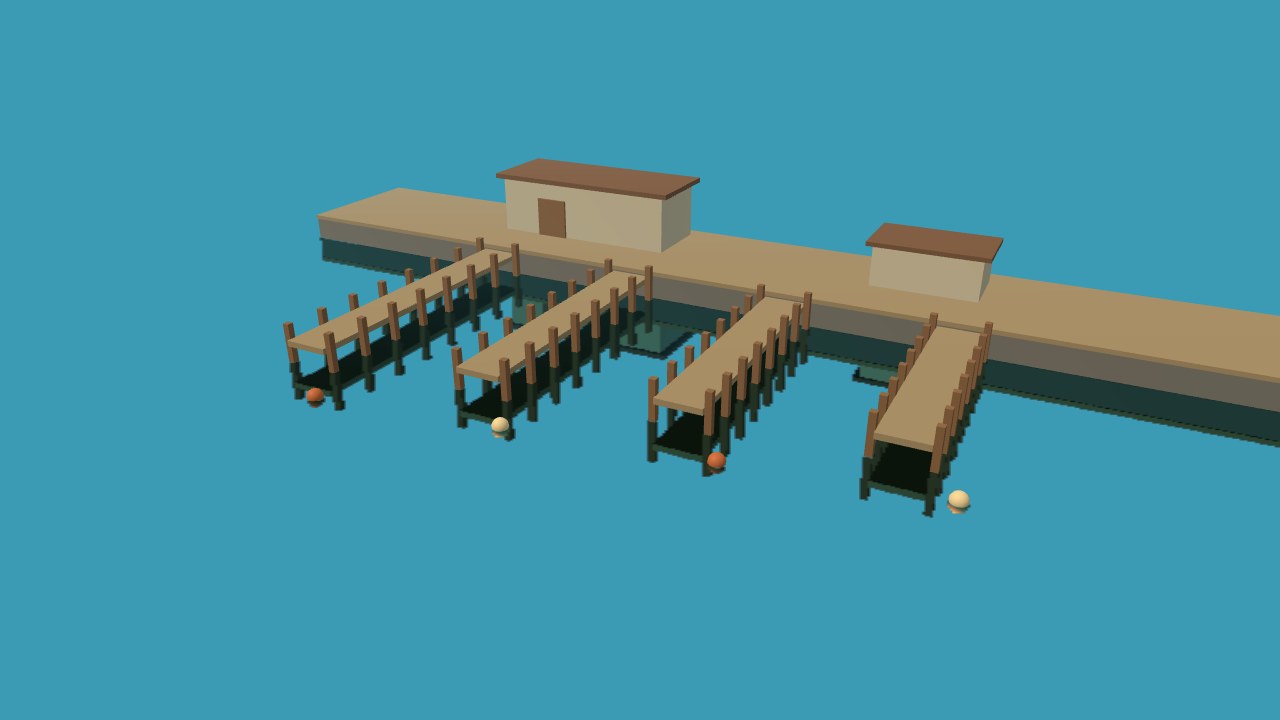
Run the harbour test
The scene redraws when you change a setting or resize the window. The panel reports the drawing-buffer pixels, the mirror target’s pixels and the draw calls and triangles submitted for that frame. Open the interactive harbour
Canvas resolution
Set Canvas scale to 2×. The browser lays out the same rectangle, while the renderer doubles both dimensions of its drawing buffer. The pixel count quadruples. Draw calls and triangles stay the same. Try 1× in your own scene first if performance falls when the camera tilts down and water fills the view. Use getDrawingBufferSize() to confirm the change reached the renderer. Drawing-buffer size in Three.js
With a fullscreen canvas of 390 × 844 CSS pixels, scale 2× gives you 1,316,640 drawing-buffer pixels. Scale 1× gives you 329,160. Check whether you can see the drop in sharpness from your normal viewing distance before settling on a cap. Screen-sized post-processing buffers should follow that cap too.
The mirror pass
Keep the canvas scale fixed and switch Reflection from 512 × 512 to 256 × 256. The mirror target goes from 262,144 pixels to 65,536. The count of draws stays put. A smaller texture still needs the reflected scene rendered into it. To measure the whole pass, switch Reflection off. The test swaps the mirror for flat water at the same height and keeps the rest of the scene in place. Reflector source for Three.js r184
If a smaller mirror barely changes your frame times but turning it off helps, check what the mirrored camera can see. Exclude details such as distant foliage or tiny signage from that pass and rerun the test. When water only needs to pick up the sky, an environment map can avoid a live mirror pass.
Draw calls
Leave the mirror on and choose Instanced under Timber posts. Each set of 64 post draws becomes one instanced draw in that view. In this scene the total drops from 159 to 33 draw calls, with 3,146 triangles submitted in both cases. It’s a good fit for dock timbers, rail posts and repeated rocks that share a geometry and material. On a large map, group instances by area so the renderer can cull a whole group when it leaves the frame. Three.js InstancedMesh reference
Set renderer.info.autoReset = false when you want both views included in the count. Reset once before your frame begins, then read the counters after the main render. This example’s renderer.render() call also triggers the reflector through its render callback. In a project with post-processing, reset before the first pass and read after the last one. Three.js render counters
Measure your scene on a phone
Record a few seconds of the same camera move on a device you plan to support. Let the scene settle first so a shader compile or an asset loading at startup doesn’t dominate the trace. Change one setting and repeat the move. Look at frame times as well as counts. Two shaders that submit the same geometry can spend very different amounts of time shading it. A frame-time trace also shows pauses that an average FPS can hide.
Copy the example
Save this as index.html and serve it locally. The test uses Three.js r184 and its Reflector addon from a CDN.
Full example source
<!doctype html>
<html lang="en">
<head>
  <meta charset="utf-8" />
  <meta name="viewport" content="width=device-width, initial-scale=1" />
  <meta name="robots" content="noindex,follow" />
  <title>Water performance test</title>
  <link rel="icon" href="data:," />
  <style>
    @font-face {
      font-family: "Host Grotesk";
      font-style: normal;
      font-weight: 300 800;
      font-display: swap;
      src: url("https://gettidewater.com/site/fonts/host-grotesk-latin.woff2") format("woff2");
    }
    * { box-sizing: border-box; }
    body {
      margin: 0; min-height: 100dvh; display: grid; grid-template-rows: 1fr auto;
      color: #1a1a18; background: #f4f4f0;
      font: 1rem "Host Grotesk", sans-serif;
    }
    #view {
      min-height: 290px; position: relative; overflow: hidden; background: #bfd8dc;
    }
    canvas { position: absolute; display: block; width: 100%; height: 100%; }
    .settings { border-top: 1px solid #d6d6cf; padding: 1.1rem clamp(1rem, 4vw, 3rem); }
    h1 { margin: 0 0 .7rem; font-size: clamp(1.5rem, 3.5vw, 2rem); font-weight: 400; }
    .controls, dl { display: grid; gap: .8rem 1rem; }
    .controls { grid-template-columns: repeat(auto-fit, minmax(min(8rem, 100%), 1fr)); }
    label { display: grid; gap: .25rem; font-size: .875rem; }
    select {
      min-height: 44px; padding: .4rem .55rem; border: 1px solid #b4b4aa;
      border-radius: 8px; color: inherit; background: #fff; font: inherit;
    }
    dl { grid-template-columns: repeat(4, 1fr); padding-top: .85rem; border-top: 1px solid #d6d6cf; margin: .9rem 0 0; }
    dt { color: #55554e; font-size: .8rem; }
    dd { margin: .1rem 0 0; font-variant-numeric: tabular-nums; }
    #error { position: relative; margin: 1rem; padding: 1rem; background: #f4f4f0; }
    @media (max-width: 500px) {
      dl { grid-template-columns: repeat(2, 1fr); }
    }
  </style>
  <script type="importmap">
    { "imports": { "three": "https://cdn.jsdelivr.net/npm/three@0.184.0/build/three.module.js" } }
  </script>
</head>
<body>
  <div id="view">
    <p id="error" role="alert" hidden></p>
  </div>
  <section class="settings" aria-label="Water performance settings">
    <h1>Water performance test</h1>
    <div class="controls">
      <label>Canvas scale
        <select id="scale" disabled>
          <option value="1">1×</option>
          <option value="2">2×</option>
        </select>
      </label>
      <label>Reflection
        <select id="reflection" disabled>
          <option value="512">512 × 512</option>
          <option value="256">256 × 256</option>
          <option value="0">Off</option>
        </select>
      </label>
      <label>Timber posts
        <select id="posts" disabled>
          <option value="meshes">Separate meshes</option>
          <option value="instances">Instanced</option>
        </select>
      </label>
    </div>
    <dl aria-label="Last render">
      <div><dt>Canvas pixels</dt><dd id="canvas-pixels">–</dd></div>
      <div><dt>Mirror pixels</dt><dd id="mirror-pixels">–</dd></div>
      <div><dt>Draw calls</dt><dd id="calls">–</dd></div>
      <div><dt>Triangles</dt><dd id="triangles">–</dd></div>
    </dl>
  </section>
  <script type="module">
import * as THREE from "three";
import { Reflector } from "https://cdn.jsdelivr.net/npm/three@0.184.0/examples/jsm/objects/Reflector.js";

const view = document.querySelector("#view");
const error = document.querySelector("#error");
const scale = document.querySelector("#scale");
const reflection = document.querySelector("#reflection");
const postMode = document.querySelector("#posts");
const numbers = new Intl.NumberFormat("en");
const canvasPixels = document.querySelector("#canvas-pixels");
const mirrorPixels = document.querySelector("#mirror-pixels");
const calls = document.querySelector("#calls");
const triangles = document.querySelector("#triangles");

let renderer;
try {
  renderer = new THREE.WebGLRenderer({ antialias: true });
} catch {
  error.hidden = false;
  error.textContent = "This example needs a browser with WebGL 2.";
}
if (renderer) start(renderer);

function start(renderer) {
  renderer.domElement.setAttribute("role", "img");
  renderer.domElement.setAttribute("aria-label", "Timber jetties in a harbour");
  view.prepend(renderer.domElement);
  renderer.info.autoReset = false;

  const scene = new THREE.Scene();
  scene.background = new THREE.Color(0xb4cbd5);
  scene.fog = new THREE.Fog(0xb4cbd5, 29, 120);
  const camera = new THREE.PerspectiveCamera(42, 1, 0.1, 320);
  const sunlight = new THREE.DirectionalLight(0xffe8cb, 1.85);
  sunlight.position.set(-6, 12, 8);
  scene.add(sunlight, new THREE.HemisphereLight(0xf4fbff, 0x6d675a, 1.45));

  const waterGeometry = new THREE.PlaneGeometry(540, 540);
  const flatWater = new THREE.Mesh(waterGeometry, new THREE.MeshBasicMaterial({ color: 0x42727a }));
  const mirror = new Reflector(waterGeometry, {
    color: 0x3e727b,
    textureWidth: 512,
    textureHeight: 512,
    multisample: 0,
  });
  flatWater.rotation.x = mirror.rotation.x = -Math.PI / 2;
  scene.add(flatWater, mirror);

  const wood = new THREE.MeshStandardMaterial({ color: 0x98714e, roughness: 0.9 });
  const deck = new THREE.MeshStandardMaterial({ color: 0xb19b73, roughness: 0.8 });
  const stone = new THREE.MeshStandardMaterial({ color: 0x838279, roughness: 0.95 });
  const buoyColors = [0xd77643, 0xffe4a8].map(color =>
    new THREE.MeshStandardMaterial({ color, roughness: 0.48 }));
  const postGeometry = new THREE.BoxGeometry(0.24, 2.5, 0.24);
  const posts = new THREE.Group();
  scene.add(posts);
  const transforms = [];
  function placeBox(width, height, depth, x, y, z, material) {
    const mesh = new THREE.Mesh(new THREE.BoxGeometry(width, height, depth), material);
    mesh.position.set(x, y, z);
    scene.add(mesh);
  }

  placeBox(42, 1.9, 6, 0, 0.06, -13, stone);
  placeBox(42, 0.18, 6.15, 0, 1.09, -13, deck);
  const plaster = new THREE.MeshStandardMaterial({ color: 0xe1d7b6, roughness: 0.88 });
  const roof = new THREE.MeshStandardMaterial({ color: 0x876348, roughness: 0.82 });
  placeBox(8.1, 2.45, 3.1, -7.2, 2.4, -13.9, plaster);
  placeBox(8.7, 0.21, 3.57, -7.2, 3.72, -13.9, roof);
  placeBox(1.4, 1.7, 0.1, -8.7, 2.03, -12.3, wood);
  placeBox(4.2, 1.65, 2.6, 8.1, 2.01, -13.7, plaster);
  placeBox(4.7, 0.18, 2.93, 8.1, 2.92, -13.7, roof);
  const buoyGeometry = new THREE.SphereGeometry(0.28, 12, 8);
  for (const [dock, x] of [-10, -3.4, 3.4, 10].entries()) {
    const length = 11.8 - dock * 0.95;
    placeBox(1.67, 0.22, length, x, 0.81, -10 + length / 2, deck);
    for (let pair = 0; pair < 8; pair++) {
      const z = -9.75 + pair * (length - 0.5) / 7;
      for (const side of [-1, 1]) {
        const post = new THREE.Mesh(postGeometry, wood);
        post.position.set(x + side * 0.95, 0.22, z);
        posts.add(post);
        transforms.push(post.position);
      }
    }
    const buoy = new THREE.Mesh(buoyGeometry, buoyColors[dock % 2]);
    buoy.position.set(x + 1.85, 0.05, 3.35 - dock * 1.1);
    scene.add(buoy);
  }
  const instances = new THREE.InstancedMesh(postGeometry, wood, transforms.length);
  const matrix = new THREE.Matrix4();
  for (const [index, position] of transforms.entries()) {
    instances.setMatrixAt(index, matrix.makeTranslation(position.x, position.y, position.z));
  }
  instances.instanceMatrix.needsUpdate = true;
  scene.add(instances);

  const target = mirror.getRenderTarget();
  const drawingSize = new THREE.Vector2();
  let activeScale = 0;
  let width = 0;
  let height = 0;

  function draw() {
    const nextScale = Number(scale.value);
    if (activeScale !== nextScale || width !== view.clientWidth || height !== view.clientHeight) {
      width = view.clientWidth;
      height = view.clientHeight;
      activeScale = nextScale;
      renderer.setPixelRatio(activeScale);
      renderer.setSize(width, height, false);
      camera.aspect = width / height;
      // Increase vertical framing so narrow screens can still see the docks.
      const wideAngle = Math.atan(Math.tan(THREE.MathUtils.degToRad(42 / 2)) * 1.65 / camera.aspect);
      camera.fov = Math.min(76, Math.max(42, THREE.MathUtils.radToDeg(wideAngle) * 2));
      camera.position.set(14, 14, 23);
      camera.lookAt(0, 0, -4.2);
      camera.updateProjectionMatrix();
    }

    const mirrorSize = Number(reflection.value);
    mirror.visible = mirrorSize > 0;
    flatWater.visible = !mirror.visible;
    if (mirror.visible && target.width !== mirrorSize) target.setSize(mirrorSize, mirrorSize);

    instances.visible = postMode.value === "instances";
    posts.visible = !instances.visible;

    // Count the reflected pass and the main render together.
    renderer.info.reset();
    renderer.render(scene, camera);
    renderer.getDrawingBufferSize(drawingSize);
    canvasPixels.textContent = numbers.format(drawingSize.x * drawingSize.y);
    mirrorPixels.textContent = numbers.format(mirror.visible ? target.width * target.height : 0);
    calls.textContent = numbers.format(renderer.info.render.calls);
    triangles.textContent = numbers.format(renderer.info.render.triangles);
  }

  for (const control of [scale, reflection, postMode]) {
    control.disabled = false;
    control.addEventListener("change", draw);
  }
  new ResizeObserver(draw).observe(view);
  draw();
}
  </script>
</body>
</html>
Related guides
For a moving surface, start with the reflective water shader. Tidewater projects can use a quality tier to cap render resolution and dynamic resolution to adjust it during play. Build a reflective water shader · Tidewater dynamic resolution