Water in React Three Fiber
Pause the waves, then drag the amplitude slider to zero. The water flattens around the two channel markers. Raise the slider and the same crest comes back in the same place. React owns the controls. The water material keeps its own clock.
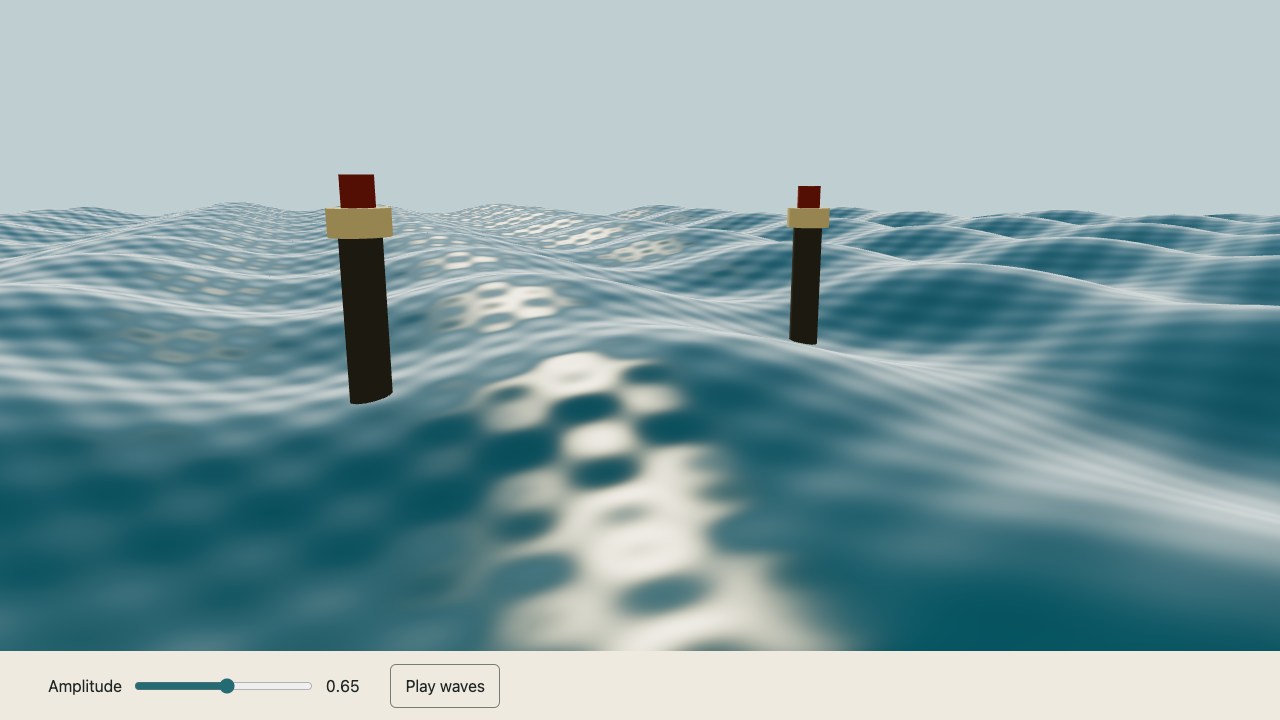
Share the canvas
If your app already has a Fiber Canvas, mount the water beside your scene objects inside it. Put the HTML slider and pause button outside the canvas. Give their common parent two pieces of React state, amplitude and paused, and pass them to the water as props. An embedded canvas needs a parent with a height. The standalone example below gives it the space left above the controls.
These examples use React 19, React Three Fiber 9 and Three.js r184. In a project with a bundler, import useMemo and useRef from React and useFrame from @react-three/fiber. Fiber hooks read context from the canvas above the component. Fiber installation and React versions · Canvas configuration
Animate the material
Only a slider gesture or a button press needs a React state update. In the frame callback, write the elapsed time straight to the mounted shader material. Fiber supplies delta in seconds. The 0.05-second cap keeps the water from jumping ahead when someone returns to a suspended tab. Pausing freezes time while still letting a slider change reach the shader on the next frame. Fiber frame callbacks
function Water({ amplitude, paused }) {
  const material = useRef(null);
  const uniforms = useMemo(() => ({
    uTime: { value: 0 }, uAmplitude: { value: 0 }
  }), []);

  useFrame((state, delta) => {
    material.current.uniforms.uAmplitude.value = amplitude;
    if (!paused) material.current.uniforms.uTime.value += Math.min(delta, 0.05);
  });

  return (
    <mesh rotation={[-Math.PI / 2, 0, 0]}>
      <planeGeometry args={[160, 160, 220, 220]} />
      <shaderMaterial ref={material} uniforms={uniforms}
        vertexShader={vertexShader} fragmentShader={fragmentShader} />
    </mesh>
  );
}
The plane starts in its local XY plane. The vertex shader adds two travelling waves to its local Z coordinate, which points up after the mesh rotation. It also calculates the slope so the highlights tilt with the crests. The smaller ripples in the fragment shader only disturb the reflection. To float a marker on this mesh, sample both waves at the same time as the shader. At world coordinates (x, z), use p.x = x and p.y = -z in the two wave expressions. The minus sign comes from rotating this plane by −90° about X.
Full working example
Save this block as index.html and serve it with python3 -m http.server 8080. It uses React.createElement so the browser can run the component without compiling JSX.
<!doctype html>
<html lang="en">
<head>
  <meta charset="utf-8">
  <meta name="viewport" content="width=device-width, initial-scale=1">
  <meta name="robots" content="noindex,follow">
  <title>React Three Fiber water example</title>
  <link rel="icon" href="data:,">
  <style>
    * { box-sizing: border-box }
    body { margin: 0; font: 1rem system-ui, sans-serif; background: #eeeae0; color: #212623 }
    #root { height: 100svh; min-height: 300px; display: grid; grid-template-rows: minmax(0,1fr) auto }
    .controls { display: flex; align-items: center; flex-wrap: wrap; gap: .35rem 1.5rem; padding: .65rem clamp(.85rem, 4vw, 3rem) }
    label { display: flex; align-items: center; gap: .65rem; min-height: 44px }
    input,button { min-height: 44px }
    input { width: clamp(72px, 14vw, 200px); accent-color: #256b74 }
    output { min-width: 4ch; font-variant-numeric: tabular-nums }
    button { padding: .45rem .9rem; border: 1px solid #787c75; border-radius: 6px; background: transparent; color: inherit; font: inherit }
  </style>
  <script type="importmap">
    {"imports":{
      "react":"https://esm.sh/react@19.1.0",
      "react/jsx-runtime":"https://esm.sh/react@19.1.0/jsx-runtime?external=react",
      "react-dom":"https://esm.sh/react-dom@19.1.0?external=react",
      "react-dom/client":"https://esm.sh/react-dom@19.1.0/client?external=react,react-dom",
      "@react-three/fiber":"https://esm.sh/@react-three/fiber@9.3.0?external=react,react-dom,three",
      "three":"https://cdn.jsdelivr.net/npm/three@0.184.0/build/three.module.js"
    }}
  </script>
</head>
<body>
<div id="root"></div>
<script type="module">
import React, { useMemo, useRef, useState } from "react";
import { createRoot } from "react-dom/client";
import { Canvas, useFrame } from "@react-three/fiber";

const h = React.createElement;
const vertexShader = `
  uniform float uTime, uAmplitude;
  varying vec3 vPosition, vNormal;
  void main() {
    vec3 p = position;
    float a = p.x * 0.31 + p.y * 0.24 - uTime * 1.35;
    float b = p.x * -0.25 + p.y * 0.52 - uTime * 1.7;
    p.z = uAmplitude * (sin(a) + 0.35 * sin(b));
    vec2 slope = uAmplitude * (vec2(0.31, 0.24) * cos(a)
               + 0.35 * vec2(-0.25, 0.52) * cos(b));
    vec4 world = modelMatrix * vec4(p, 1.0);
    vPosition = world.xyz;
    vNormal = mat3(modelMatrix) * normalize(vec3(-slope, 1.0));
    gl_Position = projectionMatrix * viewMatrix * world;
  }`;
const fragmentShader = `
  uniform float uTime, uAmplitude;
  varying vec3 vPosition, vNormal;
  void main() {
    vec3 view = normalize(cameraPosition - vPosition);
    vec2 p = vPosition.xz;
    // Short wind ripples disturb the glint without adding geometry.
    float wind = 0.55 * sin(dot(p, vec2(2.9, 1.7)) - 2.2 * uTime)
               + 0.45 * sin(dot(p, vec2(-1.8, 4.1)) - 2.6 * uTime);
    vec3 n = normalize(vNormal + uAmplitude * wind * vec3(0.07, 0.0, 0.09));
    vec3 light = normalize(vec3(-0.42, 0.48, -0.77));
    float fresnel = 0.025 + 0.975 * pow(1.0 - clamp(dot(n, view), 0.0, 1.0), 5.0);
    vec3 ray = reflect(-view, n);
    vec3 sky = mix(vec3(0.65, 0.77, 0.78), vec3(0.22, 0.41, 0.58),
                   smoothstep(-0.06, 0.65, ray.y));
    vec3 water = vec3(0.017, 0.12, 0.143) * (0.48 + 0.52 * max(dot(n, light), 0.0));
    vec3 color = mix(water, sky, fresnel);
    color += vec3(1.5, 1.28, 0.86) * pow(max(dot(ray, light), 0.0), 180.0);
    gl_FragColor = vec4(color, 1.0);
    #include <tonemapping_fragment>
    #include <colorspace_fragment>
  }`;

function Water({ amplitude, paused }) {
  const material = useRef(null);
  const uniforms = useMemo(() => ({ uTime: { value: 0 }, uAmplitude: { value: 0 } }), []);
  useFrame((state, delta) => {
    material.current.uniforms.uAmplitude.value = amplitude;
    if (!paused) material.current.uniforms.uTime.value += Math.min(delta, 0.05);
  });
  return h("mesh", { rotation: [-Math.PI / 2, 0, 0] },
    h("planeGeometry", { args: [160, 160, 220, 220] }),
    h("shaderMaterial", { ref: material, uniforms, vertexShader, fragmentShader }));
}

// Fixed channel markers give the waves a reference height.
function Beacon({ x, z, height }) {
  const parts = [[0.41, height, height / 2 - 1.2, "#4e4a41"],
                 [0.6, 0.55, height - 1.05, "#d9c290"],
                 [0.32, 0.66, height - 0.48, "#983e20"]];
  return h("group", { position: [x, 0, z] },
    ...parts.map(([radius, length, y, color], i) => h("mesh", { key: i, position: [0, y, 0] },
      h("cylinderGeometry", { args: [radius, radius, length, 24] }),
      h("meshStandardMaterial", { color }))));
}
function App() {
  const [amplitude, setAmplitude] = useState(0.65);
  const [paused, setPaused] = useState(false);
  return h(React.Fragment, null,
    h(Canvas, { dpr: [1, 1.5], camera: { position: [5, 4.1, 11], fov: 46 },
      onCreated: ({ camera }) => camera.lookAt(0, 0.3, -8),
      fallback: h("p", null, "This water example needs WebGL 2.") },
      h("color", { attach: "background", args: ["#bfced1"] }),
      h("hemisphereLight", { args: ["#fff4d3", "#628184", 2] }),
      h("directionalLight", { position: [-6, 7, -8], intensity: 2.2 }),
      h(Water, { amplitude, paused }),
      h(Beacon, { x: -4, z: -2, height: 4.3 }),
      h(Beacon, { x: 4, z: -12, height: 4.0 })),
    h("div", { className: "controls" },
      h("label", null, "Amplitude", h("input", { type: "range", min: 0, max: 1.25, step: 0.05,
        value: amplitude, onChange: e => setAmplitude(Number(e.target.value)) }),
        h("output", null, amplitude.toFixed(2))),
      h("button", { onClick: () => setPaused(value => !value) }, paused ? "Play waves" : "Pause waves")));
}
createRoot(document.querySelector("#root")).render(h(App));
</script>
</body>
</html>
If the water stops moving
Check the canvas’s frameloop first. The sample uses the default continuous loop. With frameloop="demand", a stationary camera and idle controls can leave the clock waiting for a frame. If you use demand rendering, get invalidate from useThree() and call it in an effect when amplitude or paused changes. That schedules the first frame after a click, even when paused. Inside useFrame, request the next frame while the water is playing. Also check whether a changing React key remounts the water on every slider change. A remount starts a fresh material and resets the clock. On-demand rendering in Fiber
Use Tidewater in React
The paid kit includes an ocean component for a scene that needs wave-height queries, buoyancy or reflected objects. Place the unpacked kit in your project and adjust the relative import below to match. Its node materials use the async renderer returned by createTidewaterRenderer. Start with the wrapper in place of the tutorial’s GLSL surface. Tidewater’s React component reference · Float a boat on waves
import { Canvas } from "@react-three/fiber";
import { Tidewater, Ocean, createTidewaterRenderer } from "./tidewater/r3f/index.js";

export function OceanView() {
  return (
    <Canvas gl={createTidewaterRenderer} camera={{ position: [0, 4, 10] }}>
      <Tidewater mode="swell"><Ocean /></Tidewater>
    </Canvas>
  );
}