River flow maps in Three.js
Drop a row of floating markers across a river. If the whole row moves together, you’ve given the river one speed everywhere. Give the current a velocity at each point and you can keep the centre moving quickly, slow the edges and follow the bends.
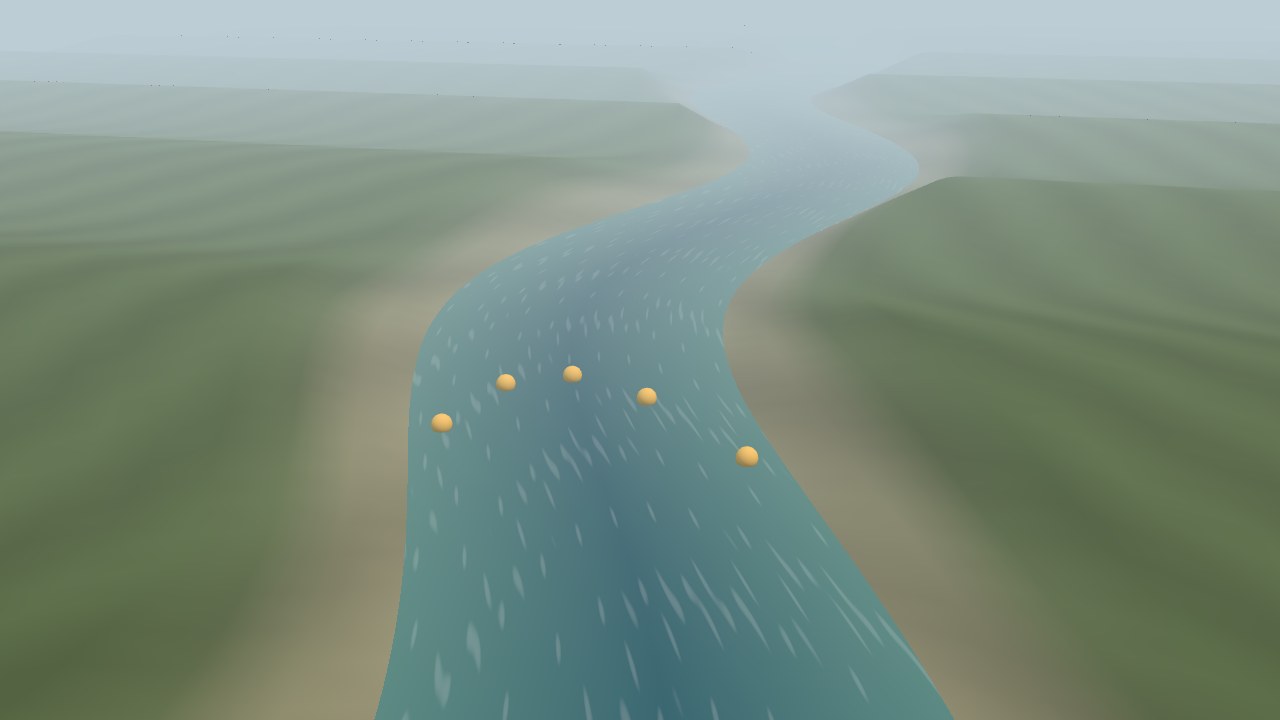
Follow the bank
In this example the centre of the channel is a sine curve x = centreAt(z). Its slope gives the amount of sideways drift for each metre of downstream travel. The speed falls toward zero as the marker approaches either bank. The same curve clips the water shading, shapes the banks and sets the points where we release the markers.
Build the current
Run the river example. Click Reset markers to line them up, then watch them fan out. Save the block as index.html and serve it locally to try different bend, width or speed values.
<!doctype html>
<html lang="en">
<head>
  <meta charset="utf-8">
  <meta name="viewport" content="width=device-width, initial-scale=1">
  <meta name="robots" content="noindex,follow">
  <title>River flow maps in Three.js demo</title>
  <link rel="icon" href="data:,">
  <style>
    body { margin: 0; overflow: hidden; font: 1rem system-ui, sans-serif; }
    canvas { display: block; }
    button {
      position: fixed; left: 1rem; bottom: 1rem; z-index: 1; min-height: 44px;
      padding: .5rem .85rem; background: #f4f4f0; color: #1a1a18;
      border: 1px solid #deded7; border-radius: 8px; font: inherit;
      cursor: pointer;
    }
  </style>
  <script type="importmap">
    { "imports": {
      "three": "https://cdn.jsdelivr.net/npm/three@0.184.0/build/three.module.js"
    } }
  </script>
</head>
<body>
  <button type="button" id="reset">Reset markers</button>
  <script type="module">
import * as THREE from "three";
import { OrbitControls } from "https://cdn.jsdelivr.net/npm/three@0.184.0/examples/jsm/controls/OrbitControls.js";

const renderer = new THREE.WebGLRenderer({ antialias: true });
document.body.append(renderer.domElement);
const scene = new THREE.Scene();
scene.background = new THREE.Color(0xbccdd6);
scene.fog = new THREE.FogExp2(0xbccdd6, 0.016);
const camera = new THREE.PerspectiveCamera(42, 1, 0.1, 170);
camera.position.set(-6, 14, -22);
const controls = new OrbitControls(camera, renderer.domElement);
controls.target.set(1, 0, 9);
controls.maxPolarAngle = Math.PI / 2 - 0.06;
controls.update();

const halfWidth = 6;
const bend = 4.6;
const frequency = 0.102;
const centreAt = (z) => bend * Math.sin(z * frequency);
function velocityAt(x, z) {
  const across = (x - centreAt(z)) / halfWidth;
  const down = 2.3 * Math.max(0, 1 - across * across);
  return [bend * frequency * Math.cos(z * frequency) * down, down];
}

const clock = { value: 0 };
const water = new THREE.Mesh(new THREE.PlaneGeometry(35, 300), new THREE.ShaderMaterial({
  uniforms: { seconds: clock, halfWidth: { value: halfWidth }, bend: { value: bend }, frequency: { value: frequency } },
  vertexShader: `varying vec2 worldXZ;
    void main() {
      vec4 world = modelMatrix * vec4(position, 1.0);
      worldXZ = world.xz;
      gl_Position = projectionMatrix * viewMatrix * world;
    }`,
  fragmentShader: `uniform float seconds;
    uniform float halfWidth;
    uniform float bend;
    uniform float frequency;
    varying vec2 worldXZ;
    void main() {
      float across = (worldXZ.x - bend * sin(worldXZ.y * frequency)) / halfWidth;
      if (abs(across) > 1.0) discard;
      float speed = 2.3 * max(0.0, 1.0 - across * across);
      float along = worldXZ.y - speed * seconds;
      float shimmer = sin(along * 0.58 + sin(across * 34.0) * 2.0);
      float crease = sin(along * 1.3 - across * 28.0);
      float streak = smoothstep(0.68, 1.0, shimmer * crease);
      vec3 waterColor = mix(vec3(0.018, 0.11, 0.14), vec3(0.085, 0.23, 0.20), abs(across));
      float distanceXZ = distance(cameraPosition.xz, worldXZ);
      waterColor = mix(waterColor + streak * 0.082, vec3(0.50, 0.61, 0.66),
        1.0 - exp(-0.000256 * distanceXZ * distanceXZ));
      gl_FragColor = vec4(waterColor, 1.0);
      #include <tonemapping_fragment>
      #include <colorspace_fragment>
    }`,
}));
water.rotation.x = -Math.PI / 2;
scene.add(water);

// Sculpt both banks from the exact curve used by the water shader.
const gravel = new THREE.Color(0x8c8b72);
const grass = new THREE.Color(0x4e6540);
const shade = new THREE.Color();
const bankMaterial = new THREE.MeshStandardMaterial({ vertexColors: true, roughness: 0.92 });
for (const side of [-1, 1]) {
  const land = new THREE.PlaneGeometry(90, 300, 48, 240);
  land.rotateX(-Math.PI / 2);
  const positions = land.attributes.position;
  const colors = [];
  for (let i = 0; i < positions.count; i++) {
    const z = positions.getZ(i);
    const offset = positions.getX(i) + 45;
    const shoulder = Math.min(1, offset * 0.18);
    positions.setXYZ(i, centreAt(z) + side * (halfWidth - 0.25 + offset),
      -0.13 + shoulder * (2.2 + Math.sin(z * 0.28) * 0.8), z);
    const dry = THREE.MathUtils.smoothstep(offset, 0.8 + 0.4 * Math.sin(z * 0.29), 4.5);
    shade.copy(gravel).lerp(grass, dry).multiplyScalar(0.92 + 0.14 * Math.sin(z * 0.63 + offset));
    colors.push(shade.r, shade.g, shade.b);
  }
  positions.needsUpdate = true;
  land.setAttribute("color", new THREE.Float32BufferAttribute(colors, 3));
  // Mirroring x flips the triangle winding on one bank.
  if (side === -1) {
    const index = land.index.array;
    for (let i = 0; i < index.length; i += 3) {
      [index[i + 1], index[i + 2]] = [index[i + 2], index[i + 1]];
    }
    land.index.needsUpdate = true;
  }
  land.computeVertexNormals();
  scene.add(new THREE.Mesh(land, bankMaterial));
}

const markers = [];
const markerMaterial = new THREE.MeshStandardMaterial({ color: 0xffc963 });
for (const offset of [-4.85, -2.5, 0, 2.5, 4.85]) {
  const marker = new THREE.Mesh(new THREE.SphereGeometry(0.34, 16, 10), markerMaterial);
  markers.push({ offset, marker });
  scene.add(marker);
}
const sun = new THREE.DirectionalLight(0xffe3bb, 2);
sun.position.set(-5, 9, -1);
scene.add(sun, new THREE.HemisphereLight(0xf0f8ff, 0x6e653a, 1.8));

function reset() {
  for (const { offset, marker } of markers) {
    marker.position.set(centreAt(0) + offset, 0.14, 0);
  }
}
document.querySelector("#reset").addEventListener("click", reset);
reset();
function resize() {
  renderer.setPixelRatio(Math.min(devicePixelRatio, 1.5));
  renderer.setSize(innerWidth, innerHeight);
  camera.aspect = innerWidth / innerHeight;
  camera.fov = camera.aspect < 1 ? 63 : 42;
  camera.updateProjectionMatrix();
}
addEventListener("resize", resize);
resize();

let last = performance.now();
renderer.setAnimationLoop((now) => {
  const dt = Math.min(Math.max(0, (now - last) / 1000), 0.05);
  last = now;
  clock.value += dt;
  for (const { offset, marker } of markers) {
    const { x, z } = marker.position;
    const [vx, vz] = velocityAt(x, z);
    marker.position.x += vx * dt;
    marker.position.z += vz * dt;
    if (marker.position.z > 60) marker.position.set(centreAt(0) + offset, 0.14, 0);
  }
  renderer.render(scene, camera);
});
  </script>
</body>
</html>
Each marker advances by velocity × dt, with distance in metres and time in seconds. The bands of light on the surface use a repeating shader pattern scrolled downstream in channel coordinates. A texture-based flow map stores two velocity components per texel. You can sample it in the shader to drive the detail normals and use the same field on the CPU for floating objects. When a flow texture repeats with time, take two samples half a cycle apart and crossfade before each sample resets. Three.js r184 Water2 flow implementation
Use the terrain in Tidewater
For a wider level with dry banks and shoals, sample the terrain for depth and bake the current into a FlowMap. This example assumes you’ve initialized a scene, camera and renderer using the runtime setup. At z = 0 and the channel’s centre, the current has a downstream component of 2.3 m/s. The depth-based scaling reduces it over the shallows and stops it over dry terrain. Runtime setup · FlowMap reference
import { createWater } from "tidewater/Tidewater.js";
import { FlowMap } from "tidewater/FlowMap.js";

const centreAt = (z) => 4.6 * Math.sin(z * 0.102);
const depthAt = (x, z) => 4 * (1 - ((x - centreAt(z)) / 6) ** 2);
const referenceFlowAt = (x, z) => [
  2.3 * 4.6 * 0.102 * Math.cos(z * 0.102),
  2.3,
];

const flowMap = new FlowMap({ size: 256, worldSize: 144, worldWidth: 36 });
flowMap.setFlowFromDepth(depthAt, referenceFlowAt, { referenceDepth: 4 }).bake();
const water = await createWater({
  scene, camera, renderer, mode: "river", ocean: { flowMap },
});

water.buoyancy.attach(marker, { ride: 0.14 });
// In your animation loop, call water.update(dt) before rendering.
Build the banks from the same depth function and put your marker at a wet point. If the material hits its texture limit with both a depth field and a flow map, Tidewater keeps the depth field in the renderer and buoyancy still uses the CPU current map. Check both on your target device. Since the managed runtime wires the current into buoyancy, applying the same drift again in your own loop doubles its speed. When you finish the scene, dispose the water and the caller-owned flowMap. In Timber Drift, release the logs and compare their speed as they move past the bank. Try Timber Drift · Building a signed depth field