Swimming pool water in Three.js
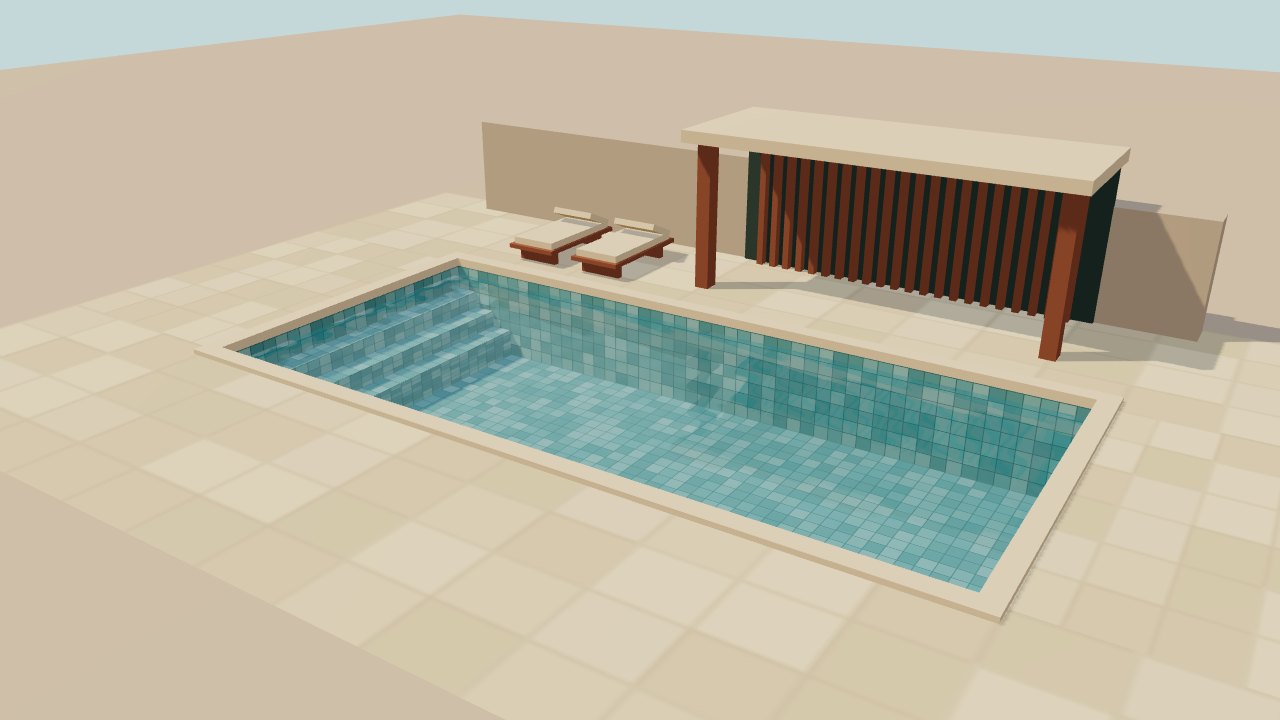
Look down into a clear pool and you can read the grout lines. Move to the edge and the same surface picks up the building behind it. A tiled basin, a plane cut to the pool opening and an angle-dependent reflection give you both views in an architectural walkthrough.
Fit the basin
Start at full scale. The opening here is 12 × 5.5 m, with the floor at y = -1.45 and the top of the coping at y = 0.32. The deck is built around an opening so the camera can see the floor. A single horizontal PlaneGeometry(12, 5.5) at y = 0 meets the inside faces of the tiled walls. If a CAD export has a curved opening, trace that outline in a Shape and use its ShapeGeometry for the water. Check the outline from above before adding ripples. Three.js ShapeGeometry
Build the shallow steps and the floor as ordinary opaque meshes. The sample paints tile colours to a canvas texture, marks it as sRGB and uses mipmaps and anisotropic filtering to keep the joints from shimmering in the low view. For a project with specified tile finishes, put the grout and tile repeat on the basin material, using the same dimensions as the drawings. Three.js CanvasTexture · Three.js colour management
Blend tiles and reflection
Three.js’s WebGL Reflector renders a mirrored view into a texture. Its projection matrix maps each point on the water plane into that view. The custom shader shifts the sample a little along two moving wave slopes and uses the same slopes to tilt the surface normal. The pool outline stays fixed against the coping. Three.js Reflector
Water reflects about 2% of incident light at normal incidence. The Schlick approximation in the shader strengthens the reflection as the view direction gets closer to parallel with the surface. A floor tile still shows through at the high camera angle, and the reflection of the timber screen stands out near the edge. The shader layers a small blue-green tint beneath the reflection, then alpha-blends both over the opaque basin. The submerged scene stays at its original projected position. A separate refraction pass can bend that view as well. Schlick’s Fresnel approximation
Try both angles
Open the demo and switch between Above the pool and At the edge. Watch the timber screen, then look at the grout by the steps. Save the example as index.html and serve it from a local web server to substitute your own dimensions or change the tint. The demo imports Three.js r184 from a CDN. Open the pool example
<!doctype html>
<html lang="en">
<head>
  <meta charset="utf-8">
  <meta name="viewport" content="width=device-width, initial-scale=1">
  <meta name="robots" content="noindex,follow">
  <title>Swimming pool water in Three.js demo</title>
  <link rel="icon" href="data:,">
  <style>
    body {
      margin: 0; background: #f4f4f0; color: #1a1a18;
      font: 1rem system-ui, sans-serif;
    }
    #view { width: 100%; height: 100dvh; }
    canvas { display: block; }
    .controls {
      position: fixed; left: 1rem; right: 1rem; bottom: max(1rem, env(safe-area-inset-bottom));
      display: flex; justify-content: center; gap: .5rem; flex-wrap: wrap;
    }
    button {
      min-height: 44px; padding: .5rem .75rem; font: inherit; cursor: pointer;
      background: #f4f4f0; border: 1px solid #1a1a18; border-radius: 8px; color: #1a1a18;
    }
    button[aria-pressed="true"] { background: #1a1a18; color: #f4f4f0; border-color: #f4f4f0; }
    [role="alert"] { position: fixed; top: 1rem; left: 1rem; right: 1rem; }
  </style>
  <script type="importmap">
    { "imports": {
      "three": "https://cdn.jsdelivr.net/npm/three@0.184.0/build/three.module.js"
    } }
  </script>
</head>
<body>
  <div id="view"></div>
  <div class="controls" role="group" aria-label="Pool camera">
    <button type="button" aria-pressed="true" data-angle="above">Above the pool</button>
    <button type="button" aria-pressed="false" data-angle="edge">At the edge</button>
  </div>
  <p id="status" role="alert" hidden>This example needs WebGL 2.</p>
  <script type="module">
import * as THREE from "three";
import { Reflector } from "https://cdn.jsdelivr.net/npm/three@0.184.0/examples/jsm/objects/Reflector.js";

const view = document.querySelector("#view");
let renderer;
try {
  renderer = new THREE.WebGLRenderer({ antialias: true });
} catch (error) {
  document.querySelector("#status").hidden = false;
  throw error;
}
renderer.setPixelRatio(Math.min(devicePixelRatio, 1.5));
renderer.shadowMap.enabled = true;
renderer.shadowMap.type = THREE.PCFShadowMap;
renderer.toneMapping = THREE.ACESFilmicToneMapping;
renderer.domElement.setAttribute("role", "img");
renderer.domElement.setAttribute("aria-label", "A tiled pool in a stone courtyard");
view.append(renderer.domElement);

const scene = new THREE.Scene();
scene.background = new THREE.Color("#c4d7d9");
const camera = new THREE.PerspectiveCamera(37, 1, 0.1, 100);
const width = 12;
const length = 5.5;
const floorY = -1.45;
const copingY = 0.32;

scene.add(new THREE.HemisphereLight("#e5eeff", "#c0aa85", 2.25));
const sun = new THREE.DirectionalLight("#ffe6bb", 3.0);
sun.position.set(-6, 9, 4);
sun.castShadow = true;
sun.shadow.mapSize.set(1024, 1024);
Object.assign(sun.shadow.camera, { left: -14, right: 14, top: 12, bottom: -12 });
sun.shadow.normalBias = 0.025;
scene.add(sun);

// An opaque image with small colour differences between tiles.
function tiles(cols, rows, palette, grout, joint) {
  const size = 16;
  const canvas = document.createElement("canvas");
  canvas.width = cols * size;
  canvas.height = rows * size;
  const ctx = canvas.getContext("2d");
  ctx.fillStyle = grout;
  ctx.fillRect(0, 0, canvas.width, canvas.height);
  for (let row = 0; row < rows; row++) {
    for (let col = 0; col < cols; col++) {
      ctx.fillStyle = palette[((col * 73856093 ^ row * 19349663) >>> 0) % palette.length];
      ctx.fillRect(col * size + joint, row * size + joint, size - joint, size - joint);
    }
  }
  const texture = new THREE.CanvasTexture(canvas);
  texture.colorSpace = THREE.SRGBColorSpace;
  texture.anisotropy = Math.min(8, renderer.capabilities.getMaxAnisotropy());
  return new THREE.MeshStandardMaterial({ map: texture, roughness: 0.88 });
}

const glaze = ["#669d9e", "#568e90", "#77a6a4", "#83adab", "#5c9292"];
const grout = "#447173";
const stone = new THREE.MeshStandardMaterial({ color: "#cebb9c", roughness: 0.88 });
const plaster = new THREE.MeshStandardMaterial({ color: "#b3a28e", roughness: 0.97 });
const oak = new THREE.MeshStandardMaterial({ color: "#8b553c", roughness: 0.85 });
const shade = new THREE.MeshStandardMaterial({ color: "#3a4b45", roughness: 0.88 });

function mesh(geometry, material, x, y, z) {
  const object = new THREE.Mesh(geometry, material);
  object.position.set(x, y, z);
  object.receiveShadow = true;
  scene.add(object);
  return object;
}

function box(w, h, d, x, y, z, material) {
  const object = mesh(new THREE.BoxGeometry(w, h, d), material, x, y, z);
  object.castShadow = true;
  return object;
}

function surface(w, h, x, y, z, material, rx, ry = 0) {
  const object = mesh(new THREE.PlaneGeometry(w, h), material, x, y, z);
  object.rotation.set(rx, ry, 0);
  return object;
}

const floorTile = tiles(48, 22, glaze, grout, 1);
surface(width, length, 0, floorY, 0, floorTile, -Math.PI / 2);

const wallTop = copingY - 0.16;
const wallHeight = wallTop - floorY;
const wallMiddle = (wallTop + floorY) / 2;
const longWall = tiles(48, 7, glaze, grout, 1);
const shortWall = tiles(22, 7, glaze, grout, 1);
surface(width, wallHeight, 0, wallMiddle, -length / 2, longWall, 0);
surface(width, wallHeight, 0, wallMiddle, length / 2, longWall, 0, Math.PI);
surface(length, wallHeight, -width / 2, wallMiddle, 0, shortWall, 0, Math.PI / 2);
surface(length, wallHeight, width / 2, wallMiddle, 0, shortWall, 0, -Math.PI / 2);

// Three submerged steps share the floor's finish.
const stepTile = tiles(2, 22, glaze, grout, 1);
for (let i = 0; i < 3; i++) {
  const top = -0.30 - i * 0.32;
  const x = -width / 2 + (i + 0.5) * 0.42;
  box(0.42, top - floorY, length, x, (top + floorY) / 2, 0, shortWall);
  surface(0.42, length, x, top + 0.002, 0, stepTile, -Math.PI / 2);
}

// Four deck pieces leave the basin opening clear.
const paving = ["#c9b999", "#c2b091", "#cdbd9f", "#d0c19f", "#bfb08f"];
const deckLong = tiles(16, 4, paving, "#aca084", 0.48);
const deckShort = tiles(5, 6, paving, "#aca084", 0.48);
for (const sign of [-1, 1]) {
  surface(20, 4, 0, copingY - 0.08, sign * (length / 2 + 2), deckLong, -Math.PI / 2);
  surface(4, length, sign * (width / 2 + 2), copingY - 0.08, 0, deckShort, -Math.PI / 2);
  box(width + 0.6, 0.16, 0.3, 0, copingY - 0.08, sign * (length / 2 + 0.15), stone);
  box(0.3, 0.16, length, sign * (width / 2 + 0.15), copingY - 0.08, 0, stone);
}
// Fill behind the paving so a low camera cannot see through the deck.
for (const sign of [-1, 1]) {
  surface(80, 38, 0, copingY - 0.09, sign * (length / 2 + 19), plaster, -Math.PI / 2);
  surface(34, length, sign * (width / 2 + 17), copingY - 0.09, 0, plaster, -Math.PI / 2);
}

// The back wall, posts and roof give the water nearby geometry to reflect.
box(15, 2.0, 0.55, -0.65, 1.24, -6.4, plaster);
box(6.8, 0.22, 2.7, 1.9, 3.05, -5.08, stone);
for (const x of [-1.2, 5.0]) box(0.26, 2.72, 0.30, x, 1.60, -4.18, oak);
for (let i = 0; i < 22; i++) box(0.12, 2.68, 0.20, -0.95 + i * 0.275, 1.58, -5.97, oak);
box(6.6, 2.7, 0.15, 1.95, 1.60, -6.1, shade);
for (const x of [-3.2, -4.7]) {
  box(1.03, 0.08, 2.08, x, 0.54, -4.46, oak);
  box(0.91, 0.14, 1.90, x, 0.64, -4.46, stone);
  box(0.92, 0.12, 0.67, x, 0.82, -5.12, stone).rotation.x = -0.42;
  for (const z of [-3.70, -5.18]) box(0.84, 0.25, 0.12, x, 0.365, z, oak);
}

const waterShader = {
  name: "PoolSurface",
  // Reflector fills these first three uniforms from its camera and target.
  uniforms: {
    tDiffuse: { value: null },
    textureMatrix: { value: new THREE.Matrix4() },
    color: { value: new THREE.Color() },
    time: { value: 0 },
  },
  vertexShader: `
    uniform mat4 textureMatrix;
    varying vec3 worldPoint;
    varying vec4 projectedReflection;

    void main() {
      worldPoint = (modelMatrix * vec4(position, 1.0)).xyz;
      projectedReflection = textureMatrix * vec4(position, 1.0);
      gl_Position = projectionMatrix * modelViewMatrix * vec4(position, 1.0);
    }
  `,
  fragmentShader: `
    uniform sampler2D tDiffuse;
    uniform vec3 color;
    uniform float time;
    varying vec3 worldPoint;
    varying vec4 projectedReflection;

    void main() {
      // Slopes of two small travelling waves on the still water plane.
      float a = dot(worldPoint.xz, vec2(8.4, 3.1)) - 2.1 * time;
      float b = dot(worldPoint.xz, vec2(3.0, -10.8)) + 2.8 * time;
      vec2 slope = 0.0025 * cos(a) * vec2(8.4, 3.1) +
                   0.0017 * cos(b) * vec2(3.0, -10.8);
      vec3 normal = normalize(vec3(-slope.x, 1.0, -slope.y));
      vec3 viewDirection = normalize(cameraPosition - worldPoint);
      float facing = clamp(dot(normal, viewDirection), 0.0, 1.0);
      float reflectance = 0.02 + 0.98 * pow(1.0 - facing, 5.0);
      vec2 uv = projectedReflection.xy / projectedReflection.w;
      uv = clamp(uv + 0.24 * slope, vec2(0.001), vec2(0.999));
      vec3 reflected = texture2D(tDiffuse, uv).rgb;

      // Standard straight-alpha blending leaves the opaque basin visible.
      float tint = 0.31 * (1.0 - reflectance);
      float alpha = reflectance + tint;
      vec3 paint = (reflected * reflectance + color * tint) / alpha;
      gl_FragColor = vec4(paint, alpha);
      #include <tonemapping_fragment>
      #include <colorspace_fragment>
    }
  `,
};
const water = new Reflector(new THREE.PlaneGeometry(width, length), {
  color: "#247f8c",
  textureWidth: 512,
  textureHeight: 512,
  multisample: 0,
  shader: waterShader,
});
water.rotation.x = -Math.PI / 2;
water.material.transparent = true;
water.material.depthWrite = false;
scene.add(water);

const poses = {
  above: new THREE.Vector3(8.1, 6.8, 12.3),
  edge: new THREE.Vector3(6.6, 1.65, 10.0),
};
const portraitPoses = {
  above: new THREE.Vector3(13.1, 10.5, 7.1),
  edge: new THREE.Vector3(13.5, 2.0, 6.0),
};
const target = new THREE.Vector3(-0.6, 0.0, -1.05);
let angle = "above";
const reducedMotion = matchMedia("(prefers-reduced-motion: reduce)");

function frameCamera() {
  const aspect = view.clientWidth / view.clientHeight;
  const views = aspect < 0.9 ? portraitPoses : poses;
  camera.position.copy(views[angle]);
  const distanceScale = Math.max(1, 1.35 / aspect);
  camera.position.sub(target).multiplyScalar(distanceScale).add(target);
  camera.lookAt(target);
  camera.aspect = aspect;
  camera.updateProjectionMatrix();
}

function resize() {
  renderer.setSize(view.clientWidth, view.clientHeight);
  frameCamera();
  if (reducedMotion.matches) render(0);
}

const buttons = document.querySelectorAll("[data-angle]");
for (const button of buttons) {
  button.addEventListener("click", () => {
    angle = button.dataset.angle;
    for (const other of buttons) other.setAttribute("aria-pressed", String(other === button));
    frameCamera();
    if (reducedMotion.matches) render(0);
  });
}

function render(ms) {
  water.material.uniforms.time.value = ms * 0.001;
  renderer.render(scene, camera);
}

function updateMotion() {
  renderer.setAnimationLoop(reducedMotion.matches ? null : render);
  if (reducedMotion.matches) render(0);
}

window.addEventListener("resize", resize);
reducedMotion.addEventListener("change", updateMotion);
resize();
updateMotion();
  </script>
</body>
</html>
Check the render cost
A 512 × 512 reflection still draws the scene a second time. Treat it as another camera when you budget draw calls. Poolside geometry and bright skylights matter most in the reflection. You can start at 256 × 256 on mobile, then compare the reflection around thin railings in your walkthrough. Limit reflective surfaces, and sample an environment map in your water material for distant scenery. Reflector texture settings · Three.js environment maps
Keep depth testing on so the coping can cover the water where their silhouettes overlap. The sample disables depth writes for the transparent surface. Check the view again when you add other transparent meshes, such as a glass fence. Three.js renders transparent objects after opaque ones and sorts them by object, so two intersecting transparent surfaces may require explicit ordering or a separate pass. Three.js material depth and transparency
Related guides
- Render moving patterns of sunlight across the floor. Underwater caustics
- Compare the view from a quay as the water height changes. Waterfront visualization